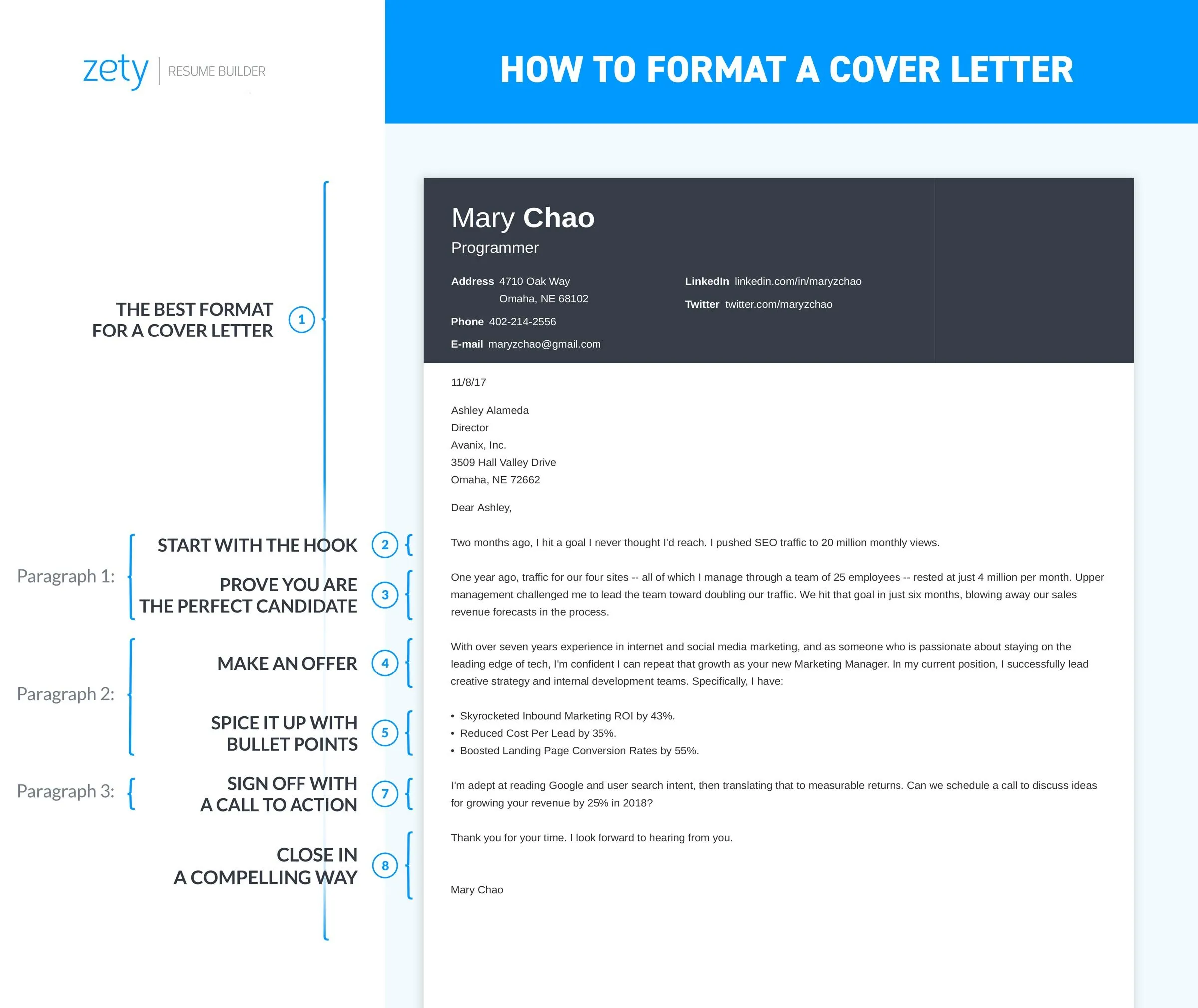
Understanding Cover Letter Font Size Basics
Choosing the right font size for your cover letter is crucial for making a positive first impression and ensuring your application is easy to read. The font size impacts the overall readability, which can significantly influence how a hiring manager perceives your attention to detail and professionalism. Selecting an appropriate font size is not simply an aesthetic choice; it directly affects how easily a recruiter can digest the information presented in your letter. This guide will provide you with all the essential information needed to select the most effective font size for your cover letter, maximizing your chances of landing an interview. Remember that while the content matters most, presentation significantly affects its impact.
Why Font Size Matters in Cover Letters
The font size in your cover letter plays a pivotal role in how easily and effectively your document is read. A cover letter that is difficult to read is likely to be overlooked, even if the content is strong. A well-chosen font size ensures your message is accessible and inviting to the reader. Both too small and too large font sizes can detract from your cover letter’s effectiveness, leading to a negative impression. The goal is to strike a balance that allows your cover letter to be both readable and visually appealing. Remember to consider the context: a clear, legible font size reflects professionalism and respect for the reader’s time.
Impact on Readability

Readability is the primary concern when choosing a font size. If the font is too small, the reader will struggle to decipher the text, leading to eye strain and disinterest. Conversely, a font that’s too large can make the document feel unprofessional and overwhelming. A good font size makes your cover letter easily scannable, allowing the hiring manager to quickly grasp the key points. Selecting a readable font size ensures your qualifications and experiences are clearly communicated, which increases the likelihood of your cover letter making the desired impact. Prioritize readability by testing your cover letter on different devices and ensuring it’s easy on the eyes.
Professionalism and First Impressions
The font size contributes to the overall professionalism of your cover letter. A carefully chosen font size demonstrates your attention to detail and understanding of professional communication standards. A poorly formatted cover letter, including an inappropriate font size, can give the impression that you lack these important qualities. Consider the font size as a reflection of your overall presentation. Selecting a professional font size enhances the first impression, suggesting that you’ve taken the time and effort to prepare a polished application. The font size, therefore, serves as a nonverbal cue, conveying a level of care and dedication.
Common Font Size Recommendations
When it comes to font size for your cover letter, several recommendations can help you achieve the best results. The aim is to find a font size that is easy to read, looks professional, and is appropriate for the context. Several industry-standard guidelines make this process more manageable. Adhering to these standards ensures your cover letter is easily accessible for hiring managers and applicant tracking systems (ATS), maximizing the chances your application stands out for the right reasons.
Ideal Font Size Range

The ideal font size range for a cover letter generally falls between 10 and 12 points for body text. This range provides a comfortable reading experience without making the text appear too small or too large. Adjustments within this range depend on the specific font you choose; some fonts may appear larger or smaller at the same point size. Ensure your font choice is clear and legible within this size range. Consider printing your cover letter to ensure the font size appears appropriate on paper, as screen displays may vary.
Font Size for Body Text
For the main body of your cover letter, use a font size between 10 and 12 points. This ensures the text is readable without overwhelming the reader. The goal is to strike a balance between readability and fitting all the necessary information onto one page. Choose a font that is clear and easy on the eyes. Avoid using a font size that is too small, as it can strain the reader’s eyes. Make the body text accessible. Use a consistent font size throughout the body text for a polished appearance. This consistency enhances the overall visual appeal and readability.
Font Size for Headings and Your Name
Headings and your name at the top of the cover letter can be slightly larger than the body text to draw attention and create visual hierarchy. Use a font size of 14-16 points for your name and the headings. This size difference helps to organize the cover letter, making it easier for the hiring manager to scan and find important information. Ensure that the headings are clearly distinct from the body text, helping to guide the reader through your cover letter’s different sections. Keep a consistent style for all headings, maintaining a professional look.
Font Choices and Font Size Considerations

The font you choose for your cover letter affects how readable it is, making font selection as essential as font size. Some fonts are easier to read than others, especially in smaller sizes. Choosing the right font helps enhance readability and convey a sense of professionalism, which is crucial in making a positive impression. Selecting a suitable font and font size is essential for ensuring your cover letter is both accessible and visually appealing.
Best Fonts for Cover Letters
Several fonts are well-suited for cover letters because of their clarity and professional appearance. Times New Roman is a classic, though often seen as somewhat dated; it remains a safe choice because of its readability. Arial and Calibri are widely used and easily readable on screen and in print. Other popular and professional options include Helvetica, Garamond, and Georgia. The key is to choose a font that is clean, clear, and easy to read, even at a slightly smaller size. Consider the style and feel of the company to make sure it aligns with your overall professional approach.
Fonts to Avoid in Cover Letters
Some fonts should be avoided in cover letters because they can appear unprofessional or are difficult to read. Script fonts, such as Comic Sans and Brush Script, can be too informal and difficult to read. Highly stylized fonts, such as those with ornate designs, can distract from the content. Monospace fonts, while suitable for coding, are often less readable for general text. Avoid fonts that are too thin, condensed, or heavy. These can be challenging to read, especially at smaller sizes. Sticking with standard, easily-readable fonts is always the best way to go when it comes to professionalism.
Adjusting Font Size for Different Sections

Adjusting font size for different sections of your cover letter can enhance readability and improve the overall presentation. Use a slightly larger font size for your name, the date, and section headings to make them stand out. The body text should use a font size that’s easy to read (10-12 points). Ensure that the font size consistently guides the reader through the document, highlighting the essential information. Maintaining consistent font sizes within sections improves the overall appearance of the cover letter. This approach helps to create a visually appealing and easily navigable document.
Formatting Your Cover Letter Effectively
Beyond font size, effective formatting is critical to ensure your cover letter is easily read and visually appealing. Formatting involves several elements, including margins, spacing, and paragraph formatting. This ensures a polished appearance that makes the hiring manager’s reading experience better. Good formatting makes your cover letter stand out, demonstrating attention to detail and professionalism. The correct formatting provides a framework that makes your content more accessible and helps you communicate your message efficiently.
Margins and Spacing Best Practices
Use standard margins (typically 1 inch on all sides) to provide sufficient white space around your text. This improves readability and gives your cover letter a clean look. Consistent margins create a balanced and professional appearance. Use 1.15 or 1.5 line spacing to separate lines of text, allowing the reader to easily follow the text. Ensure appropriate spacing between paragraphs to avoid making the text feel cramped. Proper spacing is crucial for a visually appealing and easily digestible cover letter. These formatting choices will not only look professional but also make the content accessible.
Line Spacing and Paragraph Formatting

Use single or 1.15 line spacing for the body text to ensure readability. This spacing prevents lines from running together and straining the reader’s eyes. Maintain consistency throughout the document. Separate paragraphs with a blank line to improve readability and highlight different ideas. Ensure each paragraph focuses on a specific topic or point. Avoid large blocks of text. Break up your content into shorter, more digestible paragraphs. Good paragraph formatting keeps the reader engaged and allows them to quickly scan your document for the information they want.
Page Length Considerations
Keep your cover letter concise, ideally no more than one page long. Focus on the most relevant qualifications and experiences. A shorter cover letter is more likely to be read thoroughly. Adjust your font size and formatting to fit all the necessary information onto a single page. Prioritize the information and carefully select what to include to keep your cover letter to the recommended length. Balancing content and format makes your application accessible and impactful.
Font Size and Applicant Tracking Systems (ATS)
Applicant Tracking Systems (ATS) are software applications used by employers to manage the hiring process. When submitting your cover letter, it’s essential to consider how ATS will interpret and display your document. Choosing the right font size and formatting helps ensure your cover letter is accurately parsed by the ATS. The goal is to provide all relevant information without your application being negatively affected by formatting or font choices.
Ensuring Compatibility with ATS

Use common, standard fonts like Arial, Calibri, or Times New Roman to improve compatibility with ATS. Avoid unusual fonts or styles that may not be properly read. Stick to standard formatting options. Avoid using tables, complex graphics, or unusual formatting that could cause parsing errors. Ensure the font size is within the recommended range (10-12 points) for body text. Proper formatting makes sure your application can be easily read by the system. Make sure your information is accurately captured and processed. Testing can help you avoid problems.
Tips for Avoiding Formatting Issues
To avoid formatting issues with ATS, save your cover letter as a .doc or .docx file. These formats are generally more compatible than PDFs, although PDFs are increasingly accepted. Avoid using headers, footers, or text boxes, which can sometimes cause errors. Keep the formatting simple and straightforward. Use consistent formatting throughout your cover letter. Proofread carefully to identify and correct any formatting issues before submitting your application. Careful attention will prevent any information loss.
Fine-tuning Your Cover Letter Font Size
Fine-tuning your cover letter’s font size is critical to make sure it looks good. This involves testing your cover letter and making any necessary adjustments. Reviewing and proofreading ensures that everything is aligned with your goals. This process guarantees that your cover letter is well-formatted, easily readable, and ready to leave a positive impression.
Testing Your Cover Letter Font Size

Print your cover letter to see how the font size appears on paper. What looks good on a screen might not translate well when printed. Read your cover letter on various devices to check if it is readable across different screens. Get feedback from others by asking friends or career counselors to review your cover letter. Ask them about readability and their first impressions. Experiment with different fonts and font sizes to find the best fit. Testing ensures the best results. Make small adjustments until you get it right.
Proofreading for Readability
Proofread your cover letter carefully for readability, grammar, and spelling errors. Typos or errors detract from your credibility. Make sure your text is clear and easy to follow. Check for consistency in your formatting, including font size, spacing, and headings. Ensure that the font size, combined with the font choice, enhances readability. Always revise your cover letter multiple times. Proofreading is essential for a polished and professional application.